|
MakerLabs ACM
|


|
|
MakerLabs ACM
|
|
Classes | |
| class | Exception |
| class | GoogleCloudFunctionsRequest |
| Request class which consumes body stream and provides buffered body. More... | |
| class | GoogleCloudFunctionsResponse |
| Response class which wraps standard HTTP response. More... | |
| class | HttpResponseException |
Custom Exception class which has an optional statusCode and uri to indicate details of a failed HTTP request. More... | |
Global Functions | |
| void | google_apps_script_proxy_http (GoogleCloudFunctionsRequest request, GoogleCloudFunctionsResponse response) async |
| Firebase Function HTTPS handler. More... | |
| Future< void > | permissions_check_http (GoogleCloudFunctionsRequest request, GoogleCloudFunctionsResponse response) async |
HTTPS handler to query Google Spreadsheet for ACM.User which matches ACM.Activity flatbuffer supplied in request payload. More... | |
| Future | append_activity_to_spreadsheet (SheetsApi sheets, String spreadsheetId, String sheetName, ACM.Activity activity, ACM.User user) |
Use Google Sheets API to append a new Activity row from provided Activity and User. More... | |
| Uint8List | datatable_to_user (Map datatable) |
Convert DataTable from result of Users query to ACM.User flatbuffer. More... | |
| String | extract_access_token (auth_header) |
| Parse HTTP Authorization header to extract an OAuth access token. More... | |
| Future< String > | fetch_sheet_columns (String authority, String path, String sheetName, String accessToken) |
| Fetch IDs/labels of Google Spreadsheet columns for specified sheet. More... | |
| String | generate_permissions_check_query (Map usersColumnsDatatable, List< List< String >> selectColumnLabels, String tagId) |
Generate a query to return all permissions (and optional additional columns) for a specific user by Tag ID. More... | |
| FutureReference | push_activity_to_firebase (Reference activityRef, ACM.Activity activity) |
| Append Activity details to Firebase to provided Database Reference. More... | |
| Future< void > | push_latest_user_to_firebase (Reference latestUserRef, ACM.User user) |
| Write User details to Firebase at provided Database Reference. More... | |
| SheetsApi | spreadsheet_client (String accessToken, [http.NodeClient baseClient]) |
| Create a Google SheetsApi handle using a provided OAuth access token. More... | |
| String | toColumnName (int colNum) |
| Get column letter from column index. More... | |
| int | toColumnNum (String colName) |
| Get column number from column letter. More... | |
| bool | isYesLike (String s) |
| Check whether a given string represents "yes" ("☑", "t", "y", etc) More... | |
| bool | isNoLike (String s) |
| Check whether a given string represents "no" ("☐", "f", "n", etc) More... | |
| String | nthColumnLabel (Map datatable, int i) |
| Get the label string of the Nth column from a DataTable. More... | |
| String | labelToColumnId (Map datatable, String prefix, String label) |
| Get the column letter for a specific label (with optional prefix) More... | |
| void | main () |
| Establish Dart -> JS module exports. More... | |
Global Variables | |
| HttpStatus | |
| const String | ACM_FILE_IDENTIFIER = "ACM." |
/permissions_check AWS Lambda HTTPS handler imports | |
| const | express = require("express") |
| Express server to run Google Cloud Function handler. More... | |
| const | serverless = require("serverless-http") |
| Express middleware to wrap (req,res) handlers as an AWS Lambda handler. More... | |
| const | bodyParser = require("body-parser") |
| Express middleware to provide the full request body in a req.body field. More... | |
| const | index = require("./build/node/index.dart.js") |
| (req,res)-style Dart handlers More... | |
| const | app = express() |
| Setup Express server to run (req,res)-style Dart handlers. More... | |
| app | use (bodyParser.raw()) |
| Provide request body as raw binary Buffer. More... | |
/permissions_check AWS Lambda HTTPS handler exports | |
Re-export the Express server wrapped as an AWS Lambda-compatible handler | |
| exports | permissions_check |
| Export /permissions_check AWS Lambda handler, much lower-latency than Google/Firebase Functions leading to faster tag scanning response times. More... | |
| exports | google_apps_script_proxy |
| Export /google_apps_script_proxy AWS Lambda handler. More... | |
/google_apps_script_proxy Firebase Functions handler imports | |
| const | functions = require("firebase-functions") |
| Firebase Functions SDK. More... | |
| const | index = require("./build/node/index.dart.js") |
| Dart <-> JS Interop generated entrypoint. More... | |
/google_apps_script_proxy Firebase Functions handler exports | |
| exports | google_apps_script_proxy |
| Export /google_apps_script_proxy Firebase Functions handler. More... | |
/permissions_check constants | |
| final String | SPREADSHEET_QUERY_AUTHORITY = "docs.google.com" |
| const String | SPREADSHEET_USERS_SHEET_NAME = "Users" |
| Sheet used for permissions check query. More... | |
| const String | SPREADSHEET_ACTIVITY_SHEET_NAME = "Activity" |
| Sheet used for Activity row append. More... | |
/permissions_check global variables | |
These global values will persist across function invocations. | |
| String | USER_COLUMNS_DATATABLE |
| FirebaseAdmin | FIREBASE_admin |
| App | FIREBASE_app |
| Database | FIREBASE_database |
Files | |
| file | config.production.yml |
Environment variables / settings for /permissions_check production environment. | |
| file | config.test.yml |
Environment variables / settings for /permissions_check test environment. | |
| file | build.yaml |
| Configure Dart 2.x build_runner including files and Dart2JS options. | |
| file | package.json |
Runnable targets: pub, watch, build, deploy, serve, Serverless, Express, and Firebase dependencies. | |
| file | google_apps_script_proxy_http.dart |
| HTTPS handler for /google_apps_script_proxy. | |
| file | google_cloud_functions.dart |
| Wrapper classes for Node interop HTTP Request/Response objects for Google/Firebase Functions. | |
| file | permissions_check_http.dart |
HTTPS handler to query Google Spreadsheet for ACM.User which matches ACM.Activity flatbuffer supplied in request payload. | |
| file | append_activity_to_spreadsheet.dart |
Use Google Sheets API to append a new Activity row from provided Activity and User. | |
| file | datatable_to_user.dart |
Convert DataTable from result of Users query to ACM.User flatbuffer. | |
| file | extract_access_token.dart |
| Parse HTTP Authorization header to extract an OAuth access token. | |
| file | fetch_sheet_columns.dart |
| Fetch IDs/labels of Google Spreadsheet columns for specified sheet. | |
| file | generate_permissions_check_query.dart |
Generate a query to return all permissions (and optional additional columns) for a specific user by Tag ID. | |
| file | http_response_exception.dart |
Custom Exception class which has an optional statusCode and uri to indicate details of a failed HTTP request. | |
| file | push_activity_to_firebase.dart |
| Append Activity details to Firebase to provided Database Reference. | |
| file | push_latest_user_to_firebase.dart |
| Write User details to Firebase at provided Database Reference. | |
| file | spreadsheet_client.dart |
| Provide an (authenticated) Google Sheets REST API client. | |
| file | spreadsheet_helpers.dart |
| Utility functions for spreadsheet columns<->index, string helpers, and Google Visualization DataTable parsing. | |
| file | index.dart |
| Main entrypoint for HTTP handlers, Dart -> JS interop. | |
| file | pubspec.yaml |
| Configure Dart metadata and package dependencies. | |
| file | serverless.yml |
| Configure Serverless framework for /permissions_check on AWS Lambda. | |
| Future append_activity_to_spreadsheet | ( | SheetsApi | sheets, |
| String | spreadsheetId, | ||
| String | sheetName, | ||
| ACM.Activity | activity, | ||
| ACM.User | user | ||
| ) |
Use Google Sheets API to append a new Activity row from provided Activity and User.
| sheets | Google Sheets API Handle |
| spreadsheetId | Google Sheets Spreadsheet ID |
| sheetName | Name of sheet to append to (e.g. Activity) |
| activity | ACM.Activity flatbuffer |
| user | ACM.User flatbuffer (used for MakerLabs ID and Maker Status) |
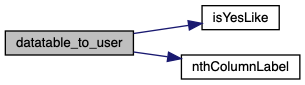
| Uint8List datatable_to_user | ( | Map | datatable | ) |
Convert DataTable from result of Users query to ACM.User flatbuffer.
| datatable | Google Visualization DataTable |
ACM.User flatbuffer bytes Expect query result columns in a hard-coded order as follows:
| String extract_access_token | ( | auth_header | ) |
Parse HTTP Authorization header to extract an OAuth access token.
| auth_header | HTTP Authorization header in format "Authorization: Bearer {token}"` |
| HttpResponseException | if header is missing or invalid |
| Future<String> fetch_sheet_columns | ( | String | authority, |
| String | path, | ||
| String | sheetName, | ||
| String | accessToken | ||
| ) |
Fetch IDs/labels of Google Spreadsheet columns for specified sheet.
| authority | Host portion of Google Visualization Query URL (e.g. "docs.google.com") |
| path | Path portion of Google Visualization Query URL (e.g. "/spreadsheets/d/{spreadsheetId}/gviz/tq") |
| sheetName | Name of sheet to query (e.g. Users) |
| accessToken | Google OAuth token to use for query |
| String generate_permissions_check_query | ( | Map | usersColumnsDatatable, |
| List< List< String >> | selectColumnLabels, | ||
| String | tagId | ||
| ) |
Generate a query to return all permissions (and optional additional columns) for a specific user by Tag ID.
| usersColumnsDatatable | Google Visualization query result DataTable |
| selectColumnLabels | (optional) Additional section headers/labels to select |
| tagId | Tag ID of desired user |
Steps:
"Permissions", count how many columns precede it (non-permissions columns) and follow it (permissions columns only).selectedColumnLabels labels to the select portion of the queryTag ID column and add it to the select portion of the query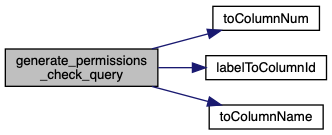
| void google_apps_script_proxy_http | ( | GoogleCloudFunctionsRequest | request, |
| GoogleCloudFunctionsResponse | response | ||
| ) |
Firebase Function HTTPS handler.
| request | HTTP request |
| response | HTTP response |
Steps:
access_token from received request headers, use it for Google API requests/google_apps_script_proxy from received URL pathhttps://script.google.com/{path}| bool isNoLike | ( | String | s | ) |
Check whether a given string represents "no" ("☐", "f", "n", etc)
| s | Candidate input string |
True if the input represents "no". | bool isYesLike | ( | String | s | ) |
Check whether a given string represents "yes" ("☑", "t", "y", etc)
| s | Candidate input string |
True if the input represents "yes". | String labelToColumnId | ( | Map | datatable, |
| String | prefix, | ||
| String | label | ||
| ) |
Get the column letter for a specific label (with optional prefix)
| datatable | Google Visualization DataTable |
| prefix | Prefix string to strip from field before matching |
| label | Label string to match |
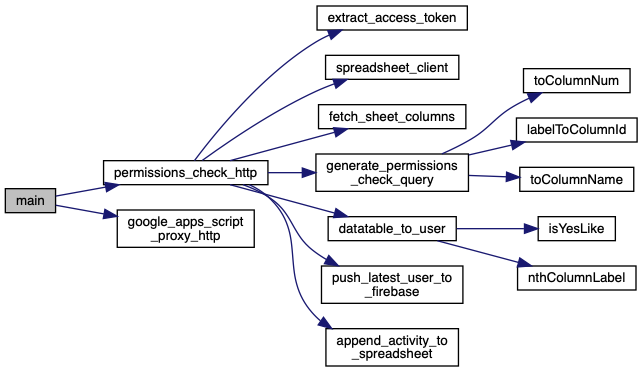
| void main | ( | ) |
Establish Dart -> JS module exports.
| String nthColumnLabel | ( | Map | datatable, |
| int | i | ||
| ) |
Get the label string of the Nth column from a DataTable.
| datatable | Google Visualization DataTable |
| i | Index of desired column, 0-based |
| Future<void> permissions_check_http | ( | GoogleCloudFunctionsRequest | request, |
| GoogleCloudFunctionsResponse | response | ||
| ) |
HTTPS handler to query Google Spreadsheet for ACM.User which matches ACM.Activity flatbuffer supplied in request payload.
| GoogleCloudFunctionsRequest | request |
| GoogleCloudFunctionsResponse | response |
ACM.User payload is ready Steps:
access_token from received request headers, use it for Google API requestslatestUserRef, activityRefUser sheet columns, fetch them if not present"X-DataSource-Auth" header to force JSON formatUser details from query resultsUser details to FirebaseACM.User flatbuffer (including permissions info) in responseActivity to Google Spreadsheet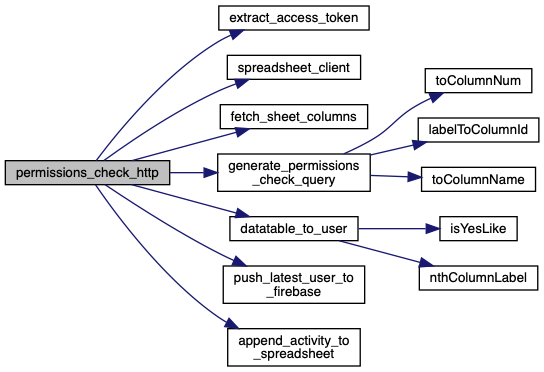
| FutureReference push_activity_to_firebase | ( | Reference | activityRef, |
| ACM.Activity | activity | ||
| ) |
Append Activity details to Firebase to provided Database Reference.
| activityRef | Firebase Database Reference (e.g. readers/{machineId}/activity) |
| activity | ACM.Activity flatbuffer |
| Future<void> push_latest_user_to_firebase | ( | Reference | latestUserRef, |
| ACM.User | user | ||
| ) |
Write User details to Firebase at provided Database Reference.
| latestUserRef | Firebase Database Reference (e.g. readers/{machineId}/latestUser) |
| user | ACM.User flatbuffer |
| SheetsApi spreadsheet_client | ( | String | accessToken | ) |
Create a Google SheetsApi handle using a provided OAuth access token.
| accessToken | OAuth access token |
| baseClient | (optional) Existing http.NodeClient HTTP client to use |
| String toColumnName | ( | int | colNum | ) |
Get column letter from column index.
| colNum | Column index, 0-based |
http://cwestblog.com/2013/09/05/javascript-snippet-convert-number-to-column-name/
| int toColumnNum | ( | String | colName | ) |
Get column number from column letter.
| colName | Column letter |
http://cwestblog.com/2013/09/05/javascript-snippet-convert-number-to-column-name/
| app use | ( | bodyParser. | raw() | ) |
Provide request body as raw binary Buffer.
| const String ACM_FILE_IDENTIFIER = "ACM." |
| const bodyParser = require("body-parser") |
Express middleware to provide the full request body in a req.body field.
| FirebaseAdmin FIREBASE_admin |
| App FIREBASE_app |
| Database FIREBASE_database |
| const functions = require("firebase-functions") |
Firebase Functions SDK.
| exports google_apps_script_proxy |
Export /google_apps_script_proxy Firebase Functions handler.
| exports google_apps_script_proxy |
Export /google_apps_script_proxy AWS Lambda handler.
| HttpStatus |
| const index = require("./build/node/index.dart.js") |
Dart <-> JS Interop generated entrypoint.
| const index = require("./build/node/index.dart.js") |
(req,res)-style Dart handlers
| exports permissions_check |
Export /permissions_check AWS Lambda handler, much lower-latency than Google/Firebase Functions leading to faster tag scanning response times.
Express middleware to wrap (req,res) handlers as an AWS Lambda handler.
| final String SPREADSHEET_QUERY_AUTHORITY = "docs.google.com" |
| const String SPREADSHEET_USERS_SHEET_NAME = "Users" |
Sheet used for permissions check query.
| String USER_COLUMNS_DATATABLE |