|
MakerLabs ACM
|


|
|
MakerLabs ACM
|
|
A single HTML page (view-user-page.html) provides the entrypoint for the main ACM search/view/edit Maker page.
The page is composed of WebComponents using Javascript classes which inherit from LitElement. This allows registering and creating custom HTML elements (e.g. <my-element>) without needing a web framework (although the Polymer framework build tool is used here to minify all JS into a single bundle for uploading to Firebase Hosting).
The following WebComponents classes / elements are defined:
And highlighted on the following diagram:
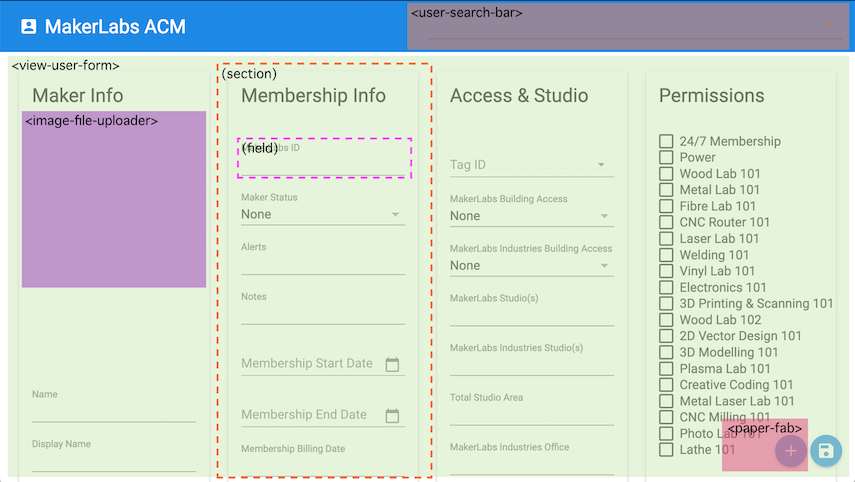
The form displayed on view-user-page.html – using the <view-user-form> WebComponent – is based on the current columns in the "Users" sheet of the ACM spreadsheet. This data is loaded dynamically when the page is loaded and a valid user is signed-in. Each section title in the first row of the sheet creates a separate Material Design "panel" in the form. Each column within that section will render as a suitable form control, based on the type of formatting/validation applied to the spreadsheet column. This latest set of form fields is fetched via a request to the ?href=users-fields handler in Google Apps Script, which runs the viewUsersFields view to create a JSON blob describing the fields.
The search bar is populated from via a Google Visualization API query which extracts all data rows from the "Users" sheet when the page is loaded.
Whenever a new Maker is added or edited through the form, the corresponding user details should be changed in the search bar after saving has completed.
Clicking the "+" floating-action-button at the bottom-right of the screen will clear the form fields, and triggers populating the MakerLabs ID column with the next available MakerLabs ID based on a request to the ?href=next-makerlabs-id handler in Google Apps Script.
Common customizations such as changing the Spreadsheet ID, or Google Drive profile photo folder ID, requires changing the properties on the <app-shell>, set at the bottom of view-user-page.html.
The Firebase Hosting rules and URL paths are configured at the top-level of this repository in the firebase.json file.
The Firebase projects (and environments used by the deploy -P <env> command) are configure at the top-level of this repository in the .firebaserc file
It is possible to modify the hard-coded strings which the Google Spreadsheet uses and should be expected to match those in <view-user-form>. These include constants such as Sheet names ("Users" / "Activity"), as well as which columns are fetched for search, and which section title (Row 1 text) is used for critical fields such as "MakerLabs ID".
The Polymer build system is used to package all Javascript and assets into a single minified bundle. As well it can be used to run a local development server which uses the WebComponent JS files directly and serves them as they are edited.
The polymer.json file is used by the polymer command to configure the build.
The build process can be invoked via:
Running the Polymer build process packages the HTML, JS, and Service Worker configuration files into the build directory. The build/es6-bundled directory is uploaded to Firebase Hosting as the root of the site.
The deployment process can be invoked (it will rebuild first) via: